OneCal Mobile 1.1: Push Notifications for Events, Bookings and Product Updates
Table of Contents
Ready to Sync Your Calendars?
Create a OneCal account to sync multiple Outlook, iCloud and Google Calendars, create Booking Links, and much more.
The newest version of the OneCal mobile app is out on the App Store and Google Play. The big addition in this release is push notifications. Your phone can now tell you when an event is about to start, when someone books time with you through a scheduling link, and when we release something new in OneCal.
You will find all of it under Settings, in a new Notifications section. Every type of notification has its own switch, so you can turn on only the ones you care about.
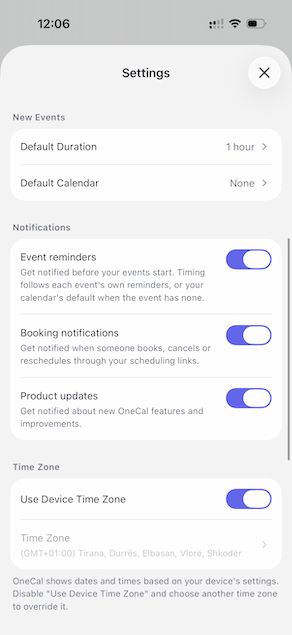
Event reminders
Turn on Event reminders and OneCal will notify you before your events start.
The timing is not something you have to configure twice. OneCal uses the reminders that are already on the event itself, and when an event has no reminders of its own, it falls back to the default reminders of the calendar the event belongs to. If you set a Google Calendar event to remind you 10 minutes before, your phone will notify you 10 minutes before.
Scheduling link notifications
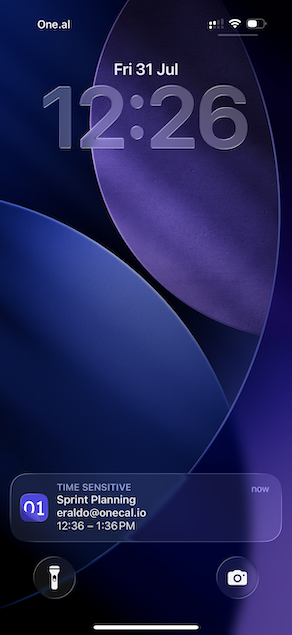
If you share OneCal scheduling links, you no longer need to keep an eye on your inbox to know what is happening with them.
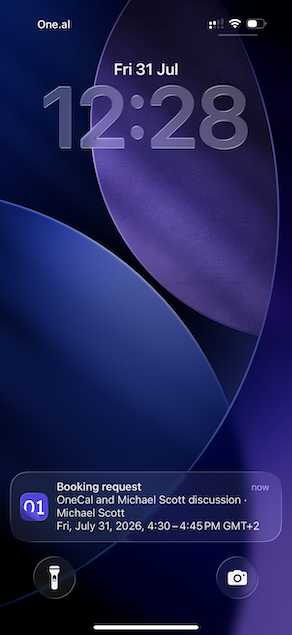
With Booking notifications turned on, you get a push notification when someone books a slot with you, when someone cancels, and when someone reschedules. Tapping the notification takes you straight to that booking in the app, where you can see the details and confirm, reject, cancel or request a reschedule.
Product updates
The last switch is Product updates. Turn it on and we will let you know when we ship a new feature or a meaningful improvement to OneCal. Tapping the notification opens the announcement inside the app, so you do not lose your place. We plan to use this rarely, only for things worth your attention.
Everything is optional
Notifications are off until you allow them. The app asks once, at a moment where the request makes sense, and if you say no, nothing breaks. You can change your mind at any time from Settings.
Other improvements in this release
- You can now copy the location of an event straight from the event details screen.
- Fixed a problem where the custom recurrence screen could open at the wrong moment when creating or editing an event.
- Fixed a bug where copying a scheduling link would show the scheduling link URL twice.
- Various smaller fixes and polish across the app.
All notification text is translated, so you get reminders and booking alerts in the language you use OneCal in.
Update the app
Push notifications are available on version 1.1, so make sure you are running the latest build from the App Store or Google Play. Once you get the latest version of the app, open the app and approve the prompt that asks you for notification access.
As always, if something does not work the way you expect, or you want a notification we do not send yet, let us know at contact@onecal.io.