AI Assistant for Google, Outlook & iCloud Calendars
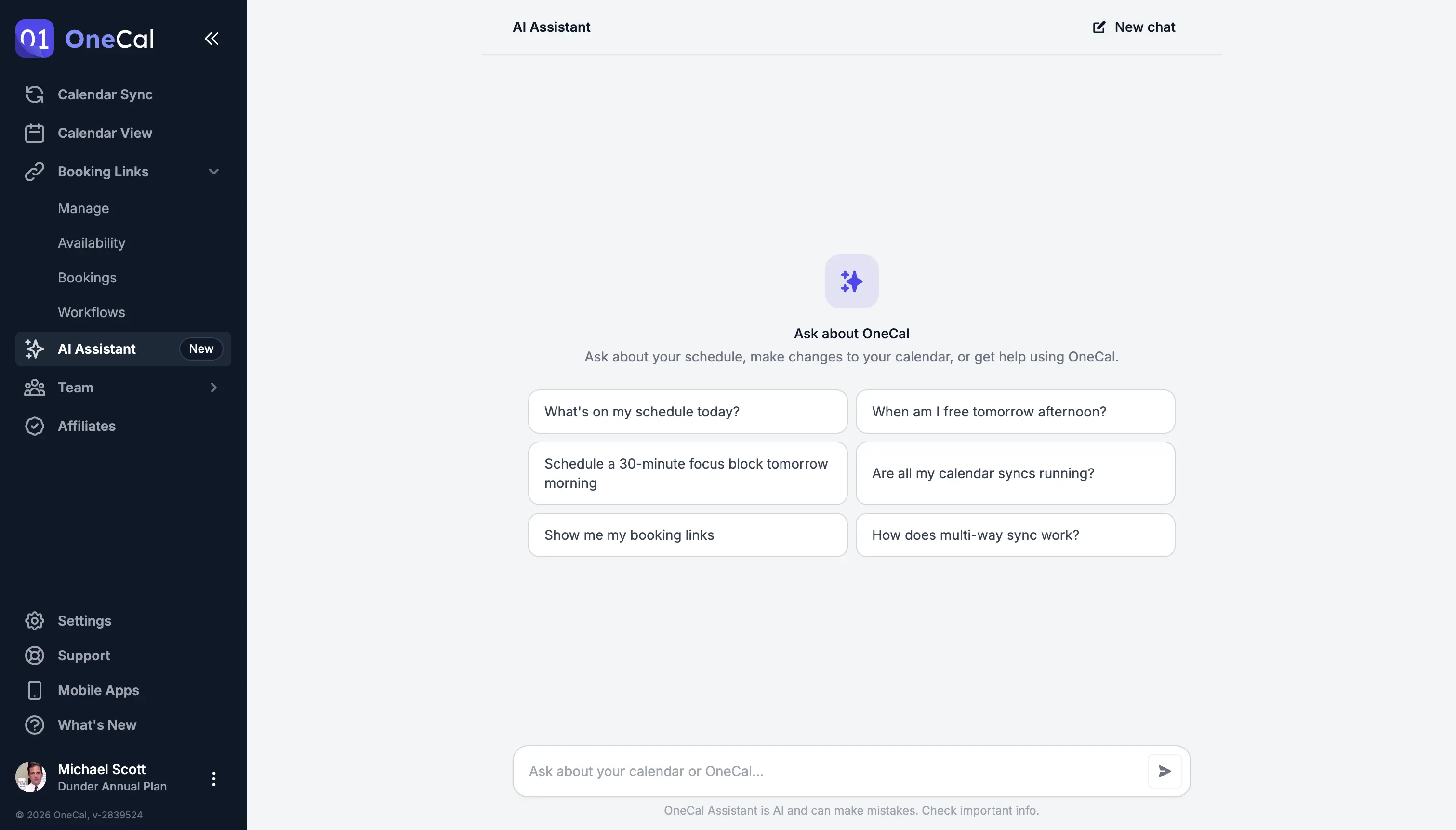
The OneCal AI Assistant is a chat built into OneCal that can help you make changes to your calendars, manage calendar syncs and scheduling links, or help with anything OneCal related.
You are in good company. OneCal is trusted by thousands of users from organizations like










One assistant for everything in OneCal
The assistant works with all your connected Google, Outlook and iCloud calendars, and with everything you have set up in OneCal. You don't need to read the documentation or learn anything, the AI Assistant knows your calendars and OneCal in and out.
Calendar at a glance
Read
Ask what is on your calendar, when you are free, or search for a specific event.
Calendar changes
Write
Create, edit and delete events, or RSVP to meeting invitations.
Calendar syncs
Sync
Check that your calendar syncs are running, create new ones, or pause, resume and re-run them.
Scheduling links & bookings
Scheduling
Create and update scheduling links, and confirm, decline, cancel or reschedule bookings.
Help & troubleshooting
Support
Ask how a OneCal feature works or why something looks off, and get an answer based on your own setup.
Included in every plan
Plans
Included in every plan, with a monthly usage allowance that depends on your plan.
Private and secure by design
Your data is never used to train AI models
OneCal is built around privacy and security, the AI Assistant is no different. Your data is never used to train AI Models, not by OneCal, and not by the AI provider that processes your messages. The first time you open the assistant, OneCal explains exactly how your data is handled before you start, so there are no surprises.
- Your calendar data and conversations are never used for AI training, by OneCal or the AI provider
- You see what is sent to the AI provider, who processes it and where, and that nothing sent is stored
- Conversations stay on your device. We do not store chats on our database*
You stay in control
Nothing changes without your approval
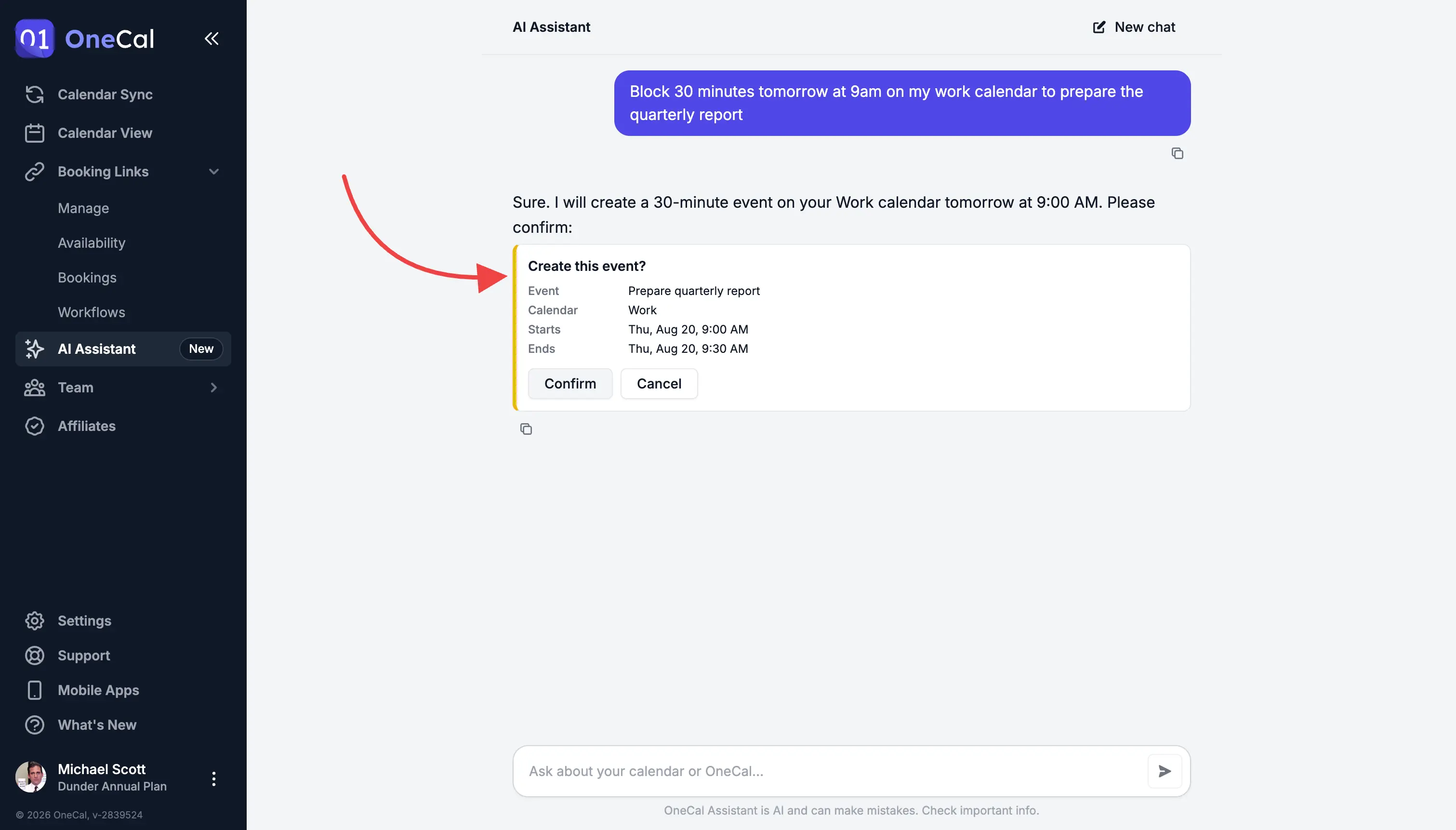
Although AI models have come a long way, and we've done our best to make the AI assistant as accurate as possible, we still think you should have the final say and confirm the upcoming changes. Before any modifications, the AI Assistant shows a confirmation card with the details of the change.
- Review the exact event, calendar sync or scheduling link details before anything happens
- Click Confirm to apply the change, or Cancel to skip it
- Any mistake the AI might make is caught before it touches your calendar
Things you can ask
A few everyday prompts that just work once your calendars are connected to OneCal.
"What does my day look like?"
Get a single, clear rundown of your day across every connected calendar.
"When am I free for a 30-minute call this week?"
Check real availability across all your calendars in one question.
"Move my 3pm to tomorrow morning"
Create, edit and delete events, or RSVP to invitations, from chat.
"Is my work-to-personal sync still running?"
Check on your syncs, create new ones, or pause, resume and re-run them.
"Create a 30-minute intro call scheduling link"
Create and update scheduling links without leaving the conversation.
"Reschedule Sarah's booking to Friday"
Confirm, decline, cancel or reschedule bookings in seconds.
"How does multi-way sync work?"
The assistant searches the OneCal docs and explains how features work.
"Why do I see the same event twice?"
Get help figuring out why something looks off, before reaching out to support.
Want the details? Read the AI Assistant documentation.
You stay in control
Private by design, confirmed by you
No AI training, chats that never leave your device, and a confirmation card before every change. Try the AI Assistant on any plan.
- Never used to train AI models, by OneCal or the AI provider
- Nothing you send is stored by the AI provider
- Conversations stay on your device, not on our servers*
* Conversations are not written to our database and do not sync between devices. To troubleshoot problems and protect the Service from abuse, OneCal keeps AI-related logs that are deleted automatically after one week and never used for AI training, as described in our Privacy Policy.

"I have 9 calendars to manage and it has saved my life. The user interface is intuitive and clean, setup is easy and there's little to no maintenance needed. I didn't read a single support article because it all just makes sense. It offers a variety of options in configuring the sync so that you share only what you want, and the syncs are fast and stay up-to-date in real time. I love the scheduling links and the public calendar and ICS features. It's made it so easy for colleagues and clients to see my actual availability and schedule with me without needing to share my calendars directly."


"OneCal is the only way I found to consistently sync my work (Outlook) and personal (Google) calendars. I tried all the suggested free methods and none were successful. I rely on both calendars and am so pleased I can see them together everywhere I look!"

"I primarily utilize OneCal to keep multiple calendars synced so that different organizations can see my shared schedule. This one tool helps me manage tons of calendars effectively and my coworkers, clients, and companies can all keep track of my schedule in real-time."

"I really appreciate how OneCal solves my need to have all of my calendars synced, so I'm not double booking time on my calendar. It's super easy to set up, and I found the user interface very nice to work with. Once I signed up, I had everything syncing in just a few minutes."

"During my search for a meeting scheduling solution, I discovered OneCal. I realized that it could effortlessly address all my calendar-related issues. The setup process was incredibly intuitive, and I can't think of a single drawback to this solution. I had it up and running in just three minutes. "

"OneCal solved ALL calendar issues!
I have 5 different gmail calendars and OneCal is like, 'Not a problem!'
I need multiple booking links - OneCal - 'Not a problem.'
I had an issue (user issue for sure) and A REAL PERSON from OneCal is emailing me with a solution before the end of day.
You simply cannot beat this tool or their amazing support."

"The ability to sync multiple calendars so I can stay on top of my life is really important to me. It made it much easier than other products I tried."

"I'm a consultant. I have 4 different Google Calendar accounts with different companies. The specific issue I needed to solve was that when I put something on one calendar, I needed it to block all of the other calendars. This seamlessly and effortlessly makes that possible. I've used it for 2-3 years now and it's perfect."
"The clean layout and constantly evolving features make it really easy to navigate and great value. It has good integrations with other websites and really quick to load as well. It's made my ROI really high and works great."

"I use OneCal for syncing between three different calendars - day job, my own business, and personal calendar. It solves the big problem of not double booking across different parts of my life. I also appreciate not having to manually cross-check calendars while maintaining privacy on my day job calendar."

"I use OneCal to manage my bookings across five different businesses, each with its own email address. I like how it cross-checks bookings and blocks off time across all my calendars, which helps avoid any duplicates. It works really well for keeping my schedule organized. I was using Calendly before, but now I use OneCal for my scheduling links, and it syncs well with Google Calendar."
"OneCal is easily the best tool for cloning appointments across multiple calendars. I manage so many client calendars that it's way too time-consuming to copy everything manually. With OneCal, I can automatically clone appointments and use my Teams/Office integration so meetings get scheduled appropriately and automatically. It's not the cheapest tool in the industry, but in my experience it's definitely the best. They also have a Discord group with the developers if you ever have UI/UX suggestions or need more direct support."
"I really like OneCal for its seamless experience and the fact it just works. I appreciate how it allows multi-to-multi calendar synchronization, making it possible to synchronize my work, private, and business calendars effectively. After trying multiple calendar tools, OneCal is the first one that actually works for me."

"It's a once-and-done setup, a few minutes to add and sync the calendars and then you never need to touch it again. And reasonable permissions manifest as well. OneCal has been head and shoulders above any other interaction I've seen, with responsive devs eager to explain their design and even implement new features."

"This has been a true life-saver to have updates syncing in real-time and eliminates the need for a third-party calendar sharing view for me. Was a breeze to set up as well. Thank you for inventing this!"

"I love OneCal for its ability to remove the chaos of scheduling across different time zones and schedules. I appreciate how it organizes both my personal and professional life, preventing me from missing important events like my kid's preschool graduation. The ease of use has significantly reduced my stress."

"Super easy to use, FANTASTIC support, pretty easy to integrate and implement. Use it daily. The calendar sync function alone is worth the price and the UI is excellent."

"I've tried many calendar synchronisation solutions between Google Calendar and Outlook: this one works like a charm. The UI is really nice and the integration is very fast. As a consultant, I need synchronized calendars both in my own company's agenda and in the agenda provided by my customers."
"OneCal is the best service I have found for calendar synchronization and management. I have tried other services, and while they work well, none work as quickly and cleanly as OneCal."
"I work with multiple clients, and it has always been a challenge coordinating availability. OneCal solves this in the simplest way possible: by copying my calendar entries across my calendars, everyone gets to see my actual availability in the system they are already using. OneCal's scheduling links handle availability for anyone outside the organizations I'm already working with. It also lets you select the level of information you share, so one client's information is never shared with another. It's a great system and has already saved me hours of time by not having to reschedule meetings."
"I like that OneCal solves the problem of double bookings for me as a freelancer with multiple email accounts. It books meetings across all my calendars automatically, which is a major benefit. I use OneCal daily and appreciate how easy it is to set up and not have to look back."
