Table of Contents
Ready to Sync Your Calendars?
Create a OneCal account to sync multiple Outlook, iCloud and Google Calendars, create Booking Links, and much more.
We’re excited to announce that OneCal now integrates with Zapier.
The OneCal x Zapier integration makes it easier to connect OneCal with the tools you already use and automate the work that happens around bookings. At launch, the OneCal Zapier integration supports triggers, meaning you can use activity in OneCal to start automated workflows in Zapier.
Whether you want to notify your team in Slack, update an internal workflow, or connect booking activity to other apps, Zapier helps you do it without writing code.
What is Zapier
Zapier is a no-code automation platform that connects thousands of apps together.
With Zapier, you can create automated workflows called Zaps. A Zap starts with a trigger in one app and then performs one or more actions in other apps. For example, when something happens in OneCal, Zapier can automatically send a Slack message, update a spreadsheet, create a task, or trigger another workflow in your stack.
In simple terms, Zapier lets OneCal communicate with the tool you already use every day.
How does the OneCal-Zapier integration work
The OneCal-Zapier integration works by exposing OneCal booking events as Zapier triggers.
When a supported event happens in OneCal, Zapier can detect it and start an automation. For example, if a booking is confirmed, cancelled, declined, or rescheduled, you can use that event to trigger a follow-up workflow in another app.
At the moment, the integration is focused on triggers, which means OneCal can start automations based on booking activity.
The general flow looks like this:
- A booking event happens in OneCal.
- Zapier receives that event through a OneCal trigger.
- Your Zap runs one or more follow-up actions in other apps.
This gives you a flexible way to automate the processes that happen after booking activity, such as team notifications, internal handoffs, reminders, and operational workflows.
OneCal triggers: what can start an automation
Currently, our Zapier integration is focused on our Scheduling Links feature, allowing users to automate scheduling events. More triggers will be available soon.
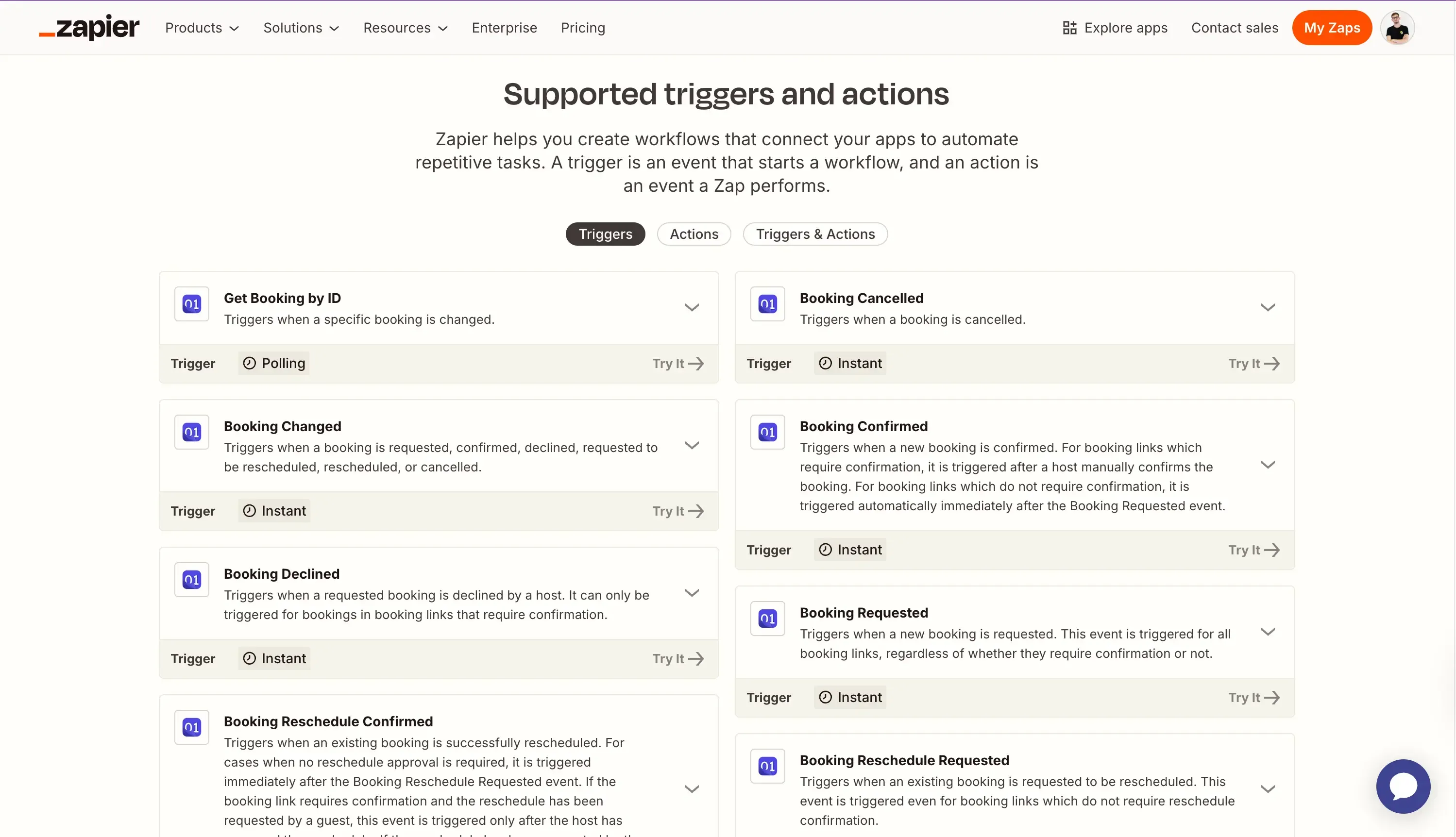
Get Booking by ID
This is a polling trigger and is useful when you want to watch a particular booking for updates.
Booking Cancelled
Use this when you want to notify your team or kick off a cancellation workflow.
Booking Changed
Triggers when a booking is requested, confirmed, declined, requested to be rescheduled, rescheduled, or cancelled.
This is a broader trigger that can be useful when you want one automation to react to any major change in a booking’s lifecycle.
Booking Confirmed
Triggers when a new booking is confirmed.
For booking links that require confirmation, this trigger runs after a host manually confirms the booking. For booking links that do not require confirmation, it is triggered automatically immediately after the Booking Requested event.
Booking Declined
Triggers when a requested booking is declined by a host.
This trigger only applies to bookings in booking links that require confirmation.
Booking Requested
Triggers when a new booking is requested.
This event is triggered for all booking links, regardless of whether they require confirmation or not.
Booking Reschedule Confirmed
Triggers when an existing booking is successfully rescheduled.
For cases where no reschedule approval is required, it is triggered immediately after the Booking Reschedule Requested event. If the booking link requires confirmation and the reschedule has been requested by a guest, this event is triggered only after the host has approved the reschedule. If the reschedule has been requested by the host, this event is triggered only after the guest has selected a new time.
Booking Reschedule Requested
Triggers when an existing booking is requested to be rescheduled.
This event is triggered even for booking links that do not require reschedule confirmation.
4. Popular Zapier automation examples for OneCal
Pre-built Zaps are coming soon. These templates will make it easier to get started with OneCal and Zapier by giving you ready-made automation workflows you can use right away.
Some of the popular Zapier automation examples for OneCal that are coming soon include:
Send a Slack message when a specific booking changes
Keep your team updated when a particular booking is modified, so everyone has the latest details without manually checking OneCal.
Send a Slack message when a booking is declined
Notify your team when a requested booking is declined, making it easier to follow up, adjust plans, or keep internal stakeholders informed.
Send a Slack message when a booking is rescheduled
Automatically alert your team when a booking is rescheduled, helping everyone stay aligned on updated meeting times.
Send a Slack message when a booking is cancelled
Let your team know when a booking is cancelled so they can quickly react, update schedules, or take any necessary follow-up actions.
Send a Slack message when a booking changes
Use this broader automation to notify your team whenever a booking is requested, confirmed, declined, requested to be rescheduled, rescheduled, or cancelled.
Send a Slack message when a new booking is requested
Notify your team as soon as a new booking request comes in, especially useful for booking links that require host confirmation.
Send a Slack message when a booking is confirmed
Keep your team informed when a booking is confirmed, whether it was automatically confirmed or manually approved by a host.
Send a Slack message when a booking reschedule is requested
Alert your team when someone requests to reschedule a booking, so they can review, approve, or prepare for a time change.
Start automating your booking workflows
The OneCal-Zapier integration gives you a simple way to connect booking activity in OneCal with the rest of your tools.
Today, you can use OneCal triggers in Zapier to build workflows around booking requests, confirmations, cancellations, declines, and reschedules. And soon, we’ll also be adding pre-built Zap templates to help you get started even faster.
If you already use OneCal and Zapier, this integration will help you reduce manual work, keep your team informed, and automate the workflows that happen around your bookings.